
Public pool schedule
A clean weekly schedule your members can read and print, with live pieces you can embed on the website they already visit.
Feature overview
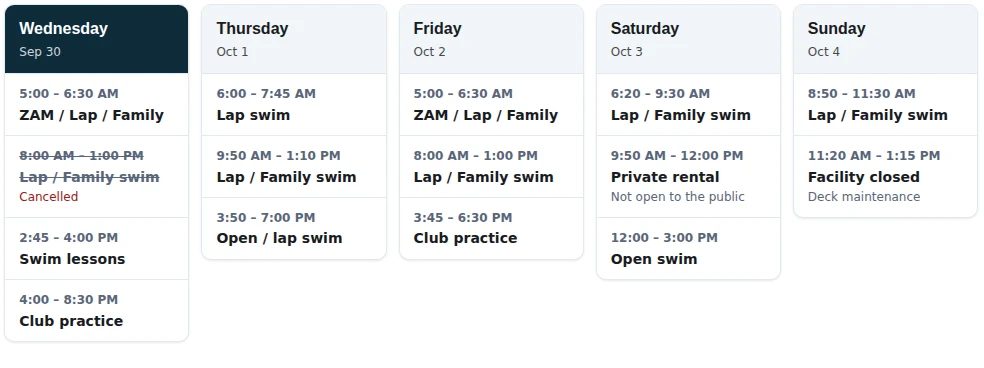
NatareOps publishes your pool schedule as a clean weekly page. Lap swim, family swim, lessons and club practice each show as their own window. Cancelled sessions are struck through, private rentals say they are not open to the public, and closures show the reason. Members can browse week by week, print the page for the wall, or see live schedule pieces embedded on your existing website.
Put the live schedule where members already look.
Copy a script or iframe embed into your existing website. Show Today at the pool, or add a notice banner for public closures and cancellations. Choose a light or dark theme, accent color, typeface and text size; the widget keeps reading from the public schedule source you selected.
Cancellations and closures, stated plainly.
A cancelled session stays on the page, struck through and marked Cancelled, so nobody drives in for a swim that is not happening. A private rental says it is not open to the public. A closure shows its reason, such as deck maintenance. Notes like a Masters window show under the session they belong to.
Week by week, and one click to print for the wall.
Step forward and back through the weeks, jump to today, and print the week you are looking at.

Clear about what a window means.
A window on the page says the pool is open for that activity. It is not a reservation and it holds no lanes. The page also tells readers that times can change at short notice, and when it was last updated.
Put your real schedule in front of members.
See your own sessions, closures and printouts, built from the schedule you already keep.